RealEye 19.14.6 - 19.15.2 Release Notes

December 8, 2025

Release Notes for Version 19.14.6 - 19.15.2 (2025-11-28 – 2025-12-08)

Version 19.14.6 (2025-11-28)

Features:
  • Training Data Collector: Added connection speed test on Welcome screen.
  • Training Data Collector: Allow GPU acceleration for face detection.
  • Training Data Collector: Allow default camera aspect ratio.
Fixes:
  • Training Data Collector: Progressive CSV uploads (early upload feature).
  • Training Data Collector: Sample-image synchronization bug fix.

Version 19.14.7 (2025-11-29)

Fixes:
  • Training Data Collector: Use CDN files for speed test instead of local MediaPipe files.
  • Training Data Collector: Use larger CDN files for accurate speed measurement.

Version 19.14.8 (2025-11-29)

Fixes:
  • Training Data Collector: Uploads now have strict timeouts to prevent the app from hanging on network issues.

Version 19.14.9 (2025-11-30)

Features:
  • Training Data Collector: Increase speed test thresholds to 16/24 Mbps.
Pricing:
  • Increase OWN participant price from 130 to 150 cents.

Version 19.15.0 (2025-12-02)

Features:
  • Training Data Collector 4.0: Major update with improved performance.
  • Reference ET Data Browser app 1.0.0: Browse content collected via Training Data Collector hosted on AWS S3.
Performance:
  • Reduce number of S3 URL presigning API calls.
Fixes:
  • Training Data Collector: iOS portrait camera stretching bug fixed.
  • Training Data Collector: Improve image compression, file extensions, and file uploads.
  • Training Data Collector: Improve unsupported device detection (e.g., iPhone SE 1st gen).
  • Training Data Collector: Improve UI on mobile.
  • Training Data Collector: Improve session naming based on dates.
  • Training Data Collector: Fix critical bug in gaze coordinate recording.
  • SDK Documentation: Fix example to correctly use setStimulusId method.

Version 19.15.1 (2025-12-03)

Fixes:
  • Refactor global settings handling in ShelfConfigurator and related templates.

Version 19.15.2 (2025-12-08)

Features:
  • Add required HTTP-Referer and X-Title headers to OpenRouter API requests.
  • Make HTTP-Referer header environment-dependent using UrlGeneratorInterface.
DevOps:
  • Reference ET Data Browser: Deployment via GitHub Actions and Runners.
  • Reference ET Data Browser: Improve processing of large folders using worker.

RealEye 19.4.2 - 19.14.5 Release Notes

November 28, 2025

Release Notes for Version 19.4.2 - 19.14.5 (2025-11-1 – 2025-11-28)

Version 19.4.2 - 19.4.3 (2025-11-03)

Fixes:
  • Fix relative ratio calculation.
  • Ensure update ready state on shelf settings.
  • Fix products behind input validation.


Version 19.4.4 (2025-11-05)

Fixes:
  • Clean up template formatting and remove unnecessary inline styles.

Version 19.5.0 (2025-11-05)

Features:
  • Save calibration data to cookie for reuse.
  • Show webcam calibration instructions when using stored calibration.
  • Add BETA flag to Tablets in Study Setup.

Version 19.5.1 - 19.5.2 (2025-11-05)

Fixes:
  • Set shelf root z-index to fix button layering issues.
  • Pause study timer during instruction step.

Version 19.5.3 (2025-11-05)

Features:
  • Add center products feature for shelf testing.
Fixes:
  • Improve centering algorithm with consistent rounding and layout validation.

Version 19.5.4 - 19.5.5 (2025-11-12)

Features:
  • Move calibration checkbox and update storage time to 15 minutes.
Fixes:
  • Fix full screen in shelf preview.
  • Fix products behind input validation.

Version 19.6.0 - 19.6.1 (2025-11-12)

Features:
  • Cloning shelves functionality.
  • Fullscreen shelf recording.
  • Set product height based on height_percent value in imported .xlsx file.
Fixes:
  • Continue after upload image error.
  • Change study timer logic
  • Don'tstop time during separator and questions.

Version 19.7.0 (2025-11-18)

Features:
  • Center products on shelf feature with documentation.
Fixes:
  • Import shelf height from .xlsx file.

Version 19.7.1 - 19.7.3 (2025-11-18)

Features:
  • Finish on purchase option for shelf tests.
  • Finish on checkout with labels and prices.
Fixes:
  • Continue after wrong image format error.

Version 19.8.0 (2025-11-18)

Features:
  • Random products and shelves functionality.
Fixes:
  • Revert study timer behavior on certain study types.

Version 19.9.0 - 19.9.1 (2025-11-18 - 2025-11-19)

Features:
  • Batch 3D view for shelves.
  • Add pins for shelves.
Fixes:
  • Ensure proper role check for user in AOI dashboard template.

Version 19.10.0 - 19.10.3 (2025-11-19 - 2025-11-21)

Features:
  • Loading images of shelf improvements.
  • Survey after each shelf functionality.
  • Allow running shelf test with item IDs in URL.
Fixes:
  • Fix final number of units in cart.
  • Fix YouTube embed error on HTTPS production.
  • Fix study settings device checkboxes layout - display vertically.
  • Disable start study button and set max study duration when time slider is not present.
  • Enhance Docker support for Apple Silicon.
  • Speed up Webpack build.

Version 19.11.0 (2025-11-24)

Fixes:
  • Remove obsolete CSV columns.

Version 19.12.0 (2025-11-24)

Fixes:
  • Improve testCode parameter handling.

Version 19.13.0 - 19.13.1 (2025-11-25)

Security:
  • Remove obsolete endpoint for overriding fixations.
  • - Remove API token from JS/TS files.
Fixes:
  • Fix for MacBook camera in vertical mode.

Version 19.14.0 - 19.14.1 (2025-11-25 - 2025-11-26)

Features:
  • Add Pickup Ratio [%] metric to user interactions, UI, and CSV export.
Fixes:
  • Fix AOI time range validation to skip checks when no AOIs are defined or at end of playback.
  • Fix head watcher 404 error.

Version 19.14.2 - 19.14.5 (2025-11-26)

Fixes:
  • Change ETv3 calibration points position.

RealEye 18.62.8 - 19.4.1 Release Notes

October 31, 2025

Release Notes for Version 18.62.8 - 19.4.1 (2025-09-27 – 2025-10-31)

Version 18.62.8 - 18.62.11 (2025-09-29)

Fixes:
  • Server optimization improvements.


Version 18.62.12 - 18.62.13 (2025-10-01)

Fixes:
  • Update composer packages.
  • Remove unused image and SVG files


Version 18.62.14 - 18.62.17 (2025-10-02)

Features:
  • Update VAI algorithm to version 0.6 with improved speed calculation and inclusive metrics.
Fixes:
  • Performance improvements for license usage notification.
  • License notification improvements.

Version 18.63.1 - 18.64.1 (2025-10-06)

Features:
  • API 2.7.0: /studies/search and/studies/{studyId}/participants-count endpoints.
  • Add instruction before shelf stimulus.
  • Use raw gazes for cluster detection and reduce pixel threshold.

Version 18.64.2 - 18.64.3 (2025-10-07)

Features:
  • Shelf zooming adjustments.
  • Adjust calibration dots' position and animation speed for ETv3.

Version 18.64.4 - 18.64.5 (2025-10-08)

Fixes:
  • Development environment improvements.

Version 18.65.0 - 18.65.4 (2025-10-10)

Features:
  • Add usage information in collaboration page.

Version 18.65.5 (2025-10-15)

Fixes:
  • Validate AOIs after image replacement.

Version 19.0.0 (2025-10-16)

Features:
  • Major version update with improved architecture.
  • Workflow for running tests in CI.

Version 19.0.1 - 19.0.3 (2025-10-20)

Fixes:
  • Fix stratched images.
  • Fix cart components spacing.

Version 19.1.0 (2025-10-20)

Features:
  • Shelf import/export with enhanced error handling.
  • Retry logic and streaming support for large AOI responses

Version 19.1.1 - 19.1.2 (2025-10-21)

Fixes:
  • Handle not supported exif files.
  • Import progress fixes.

Version 19.1.3 - 19.2.1 (2025-10-22)

Features:
  • Shelf Import progress UI improvements.
  • Shelf export functionality.
Fixes:
  • Study duration now controls study end, not sum of shelf durations.
  • Fix cloning shelf (improved function for cloning global and stimuli settings).

Version 19.2.2 (2025-10-23)

Features:
  • Rename "Added to cart" to"Purchase ratio".

Version 19.2.3 - 19.3.1 (2025-10-27)

Fixes:
  • Optimized K-factor calculations.
  • Ensure update finished before updating another item.

Version 19.3.2 (2025-10-28)

Fixes:
  • Fix missing AOI images in the report.

Version 19.3.3 - 19.4.1 (2025-10-30)

Features:
  • Warn users before replacing stimuli.
  • Detect smartphone screen orientation and prompt rotation instead of screening out.
Fixes:
  • Validate max answer length (prevent saving survey when input exceeds maximum allowed value).
  • Relative ratio calculation fixed.
  • Refactor AOI and RealEye directory paths for consistency and clarity.
  • Improve logging and progress tracking in data preprocessing.

RealEye 18.57.2 - 18.62.4 Release Notes

September 26, 2025

Release Notes for Version 18.57.2 to 18.62.4 (2025-09-01 – 2025-09-25)

Version 18.57.2 (2025-09-01)

Features:
  • Calibration buttons moved to slide header for horizontal smartphone mode.
Fixes:
  • API backwards compatibility for canFieldWithSmartphone.
  • Enforce limit of members per team according to license specification.


Version 18.58.0 (2025-09-01)

Features:
  • Horizontal smartphone test improvements.


Version 18.58.1 (2025-09-02)

Features:
  • Shopping cart added.
Fixes:
  • Added horizontal smartphone data view.


Version 18.58.2 (2025-09-02)

Features:
  • Removed upgrade button for non-manager users.
Fixes:
  • Shelf labels.
  • Preview content loading on demand.


Version 18.58.3 (2025-09-04)

Features:
  • VAI Reach on AOI enhancements.
Fixes:
  • Enforce single device login per account.


Version 18.58.4 (2025-09-05)

Features:
  • Temporarily disabled clustered gazes impact on quality grade.


Version 18.58.5 (2025-09-08)

Fixes:
  • Misplaced face position for mobile devices.


Version 18.58.6 (2025-09-08)

Features:
  • Allow purchase of additional license seats.


Version 18.58.10 (2025-09-09)

Features:
  • Set minimal number of extra participants to 25.


Version 18.58.11 (2025-09-09)

Features:
  • Change RealEye participants step from 10 to 25.
UX:
  • Adjust horizontal orientation messages.


Version 18.59.0 (2025-09-10)

Fixes:
  • Default value for canFieldWithSmartphoneHorizontal API field.


Version 18.59.1 (2025-09-10)

Features:
  • Add link for purchasing extra collaborator seats.


Version 18.59.3 (2025-09-10)

Features:
  • Add item_filename to facial coding CSV report.
Fixes:
  • Time slider inputs.
  • Update AOI metrics on part deletion.


Version 18.59.5 (2025-09-11)

Fixes:
  • Default values for potentially missing array keys.
  • Purchase form.


Version 18.60.2 (2025-09-11)

Fixes:
  • More clear messages about why study cannot be run.


Version 18.60.5 (2025-09-12)

Features:
  • Custom minimal value and step for RealEye participants in a study.
Fixes:
  • Link Billing Area link to company instead of first license purchaser.


Version 18.60.6 (2025-09-12)

UI:
  • Make VAI Reach with 1 decimal place.
Fixes:
  • Instagram study type - only for vertical smartphones.


Version 18.61.0 (2025-09-15)

Features:
  • Update dependencies.
UX:
  • Respect zoom level of image while downloading.


Version 18.61.2 (2025-09-16)

UI/UX:
  • Move author to study name column.


Version 18.61.3 (2025-09-17)

UX:
  • Disable scroll for shelf testing.


Version 18.61.4 (2025-09-17)

Fixes:
  • Null comparison for VAI reach.


Version 18.62.3 (2025-09-24)

Fixes:
  • AOI position for shelf testing.


Version 18.62.4 (2025-09-25)

Features:
  • Remove billing area link for non-managers.

RealEye 18.48.14 - 18.57.1 Release Notes

August 29, 2025

Release Notes for Version 18.48.14 to 18.57.1 (2025-07-23 – 2025-08-27)

Version 18.48.14 (2025-07-23)

Fixes:
  • Prevented creation of AOI (Area of Interest)with 0s time.
Features:
  • Introduced study time limit function for all study types.
  • Add save button to the study edit flow for better UX.
  • Move"Add url page" button to modal footer for improved UI.
  • Hide display time setting for screen recording items.
Improvements:
  • Refactored study duration input fields for unified naming and consistency.

Version 18.49.0 (2025-07-25)

Fixes:
  • Prevented AOI table export without proper licensing.
  • Fixed dynamic hotspot data binding in image replacement modal.
Features:
  • Added content setup for study save button.

Version 18.50.0 (2025-07-31)

Features:
  • Added new accuracy data in the study view
  • Added participant's name and grade to the accuracy view.

Version 18.50.2 (2025-08-04)

Changes:
  • Added item_filename to raw gazes CSV export.

Version 18.50.3 (2025-08-05)

UX:
  • Multiple shelves support added.

Version 18.51.0 (2025-08-05)

UX:
  • AOI (Area of Interest) now supports friendly names.

Version 18.51.5 (2025-08-06)

Fixes:
  • Fixed saving hotspots in studies.

Version 18.52.0 (2025-08-07)

Features:
  • Implemented study duration handling for screen recording studies.
  • Added warning messages for study duration limits.
  • Added author email filter and display in study list.
  • Author column is now displayed only for team collaborations.
  • Translated hardcoded strings in UI.

Version 18.53.0 (2025-08-11)

Features:
  • Improved shelf support with maximum shelves settings.
  • Added study preview save improvemen

Version 18.53.1 (2025-08-11)

Fixes:
  • Fixed slash and uppercase insensitive URLs.

Version 18.53.6 (2025-08-11)

Fixes:
  • Fixed shelf mockup twig errors for new shelves.
  • Fixed tag filter disappearing

Version 18.53.7 (2025-08-12)

UI:
  • Updated expiring licence information.

Version 18.53.8 (2025-08-13)

Fixes:
  • Fixed flickering in video during time slider movement.

Version 18.53.9 (2025-08-14)

Fixes:
  • Fixed RelativeFixationsRatio calculation to reflect correct exposure results.
  • Removed background from products in storage

Version 18.53.10 (2025-08-14)

UI:
  • Reach AOI map enabled.

Version 18.53.11 (2025-08-18)

Fixes:
  • Fixed base number of participants who saw AOI in reporting.

Version 18.53.13 (2025-08-18)

UI:
  • Locked playback start for specific studies.

Version 18.53.17 (2025-08-19)

UI:
  • Updated sidebar: renamed 'AI Predictor' to 'Attention Predictor'.

Version 18.54.0 (2025-08-19)

Enhancements:
  • Bumped various dependencies for training data collector.

Version 18.55.0 (2025-08-19)

Features:
  • Locked start of player for studies.

Version 18.56.0 (2025-08-19)

Fixes:
  • Fixed AOI draw issues.

Version 18.56.3 (2025-08-22)

Enhancements:
  • Added default data quality and AOI time range settings to company model.

Version 18.56.4 (2025-08-22)

Hotfix:
  • Cleaned URI for both stimuli filename and website when comparing.

Version 18.56.5 (2025-08-22)

UI:
  • Added Hebrew language support to study instructions.

Version 18.57.1 (2025-08-27)

Improvements:
  • Company defaults settings improvements merged.

RealEye 18.43.0 - 18.48.13 Release Notes

July 25, 2025

Release Notes for Version 18.43.0 to 18.48.13 (2025-07-02 – 2025-07-22)

Version 18.43.0 (2025-07-02)

Features:
  • Added RealEyeWebcamV3 to sidebar and updated translations.

Version 18.44.0 (2025-07-02)

Fixes:
  • Fixed `canAnalyzeData` property for study embedded website item boxes.
  • Resolved division by zero error in droprate calculation.

Version 18.44.2 (2025-07-04)

Features:
  • Disabled Basic license purchase if team collaboration is active.
  • Introduced **VAI Hold**: Average time participants spent looking at AOIs relative to visibility time.
UI/UX Improvements:
  • Rounded VAI values to the first decimal place.

Version 18.45.0 (2025-07-04)

Fixes:
  • Fixed Statistics and Tools button issue

Version 18.45.3 (2025-07-08)

Fixes:
  • Deactivated API keys for licenses without API access.
  • Corrected VAI Hold calculation logic.

Version 18.46.0 (2025-07-08)

Features:
  • Added support for retrieving user interactions by custom parameters and specific tests.

Version 18.46.2 (2025-07-10)

Fixes:
  • Enabled audio recording in TestRunner and improved microphone handling.

Version 18.46.6 (2025-07-14)

Fixes:
  • Fixed preview generation for shelf testing.

Version 18.46.9 (2025-07-16)

Features:
  • Added white-label domain support for iframe embedding.
  • Updated Polish translations for AOI metrics and CSV exports.
Fixes:
  • Fixed embedded website AOI gaze mapping.

Version 18.46.12 (2025-07-17)

UX Improvements:
  • Implemented "no background" option for shelf testing.
Fixes:
  • Handled edge case for stimuli flow items missing`stimulusId`.

Version 18.47.0 (2025-07-18)

Features:
  • Implemented clustered gazes detection for improved gaze pattern analysis.
Enhancements:
  • Updated default minimum cluster size for better accuracy.

Version 18.48.0 (2025-07-21)

Fixes:
  • Fixed undefined variable `theme` in UI rendering.

Version 18.48.10 (2025-07-21)

Features:
  • Improved fixation duration calculations and added an effective fixation duration method.

Version 18.48.12 (2025-07-22)

Fixes:
  • Disabled gaze clustering for mouse-tracker to improve accuracy.

Version 18.48.13 (2025-07-22)

Fixes:
  • Further refinement to prevent gaze clustering computations for mouse-tracker.

RealEye 18.39.0 - 18.42.0 Release Notes

June 16, 2025

Release Notes for Version 18.39.0 to 18.42.0 (2025-06-16 – 2025-07-01)

Version 18.39.0 (2025-06-16)

Features:
  • Introduced AI-generated AOI report analysis.
Fixes:
  • Resolved permission issues for AOI AI reports.
  • Fixed negative relative TTFF for stimuli using SDK.
  • Fixed a typo in CSV report headers.

Version 18.39.7 (2025-06-17)

Features:
  • Added sharing secret to AOI report in the heatmap view.
  • Introduced "Shopper metrics" UX improvement.
Fixes:
  • Solved a permission issue for companies without a Company Manager.
  • Allowed the use of the back button after changing filters.

Version 18.39.9 (2025-06-18)

Features:
  • Replaced "AI Heatmaps" with a link to "Attention Predictor".
  • Removed AI Prediction (ALPHA) module and linked to the Attention Predictor Promo app.
UI/UX Improvements:
  • Added a Shopper follow-up survey.

Version 18.40.0 (2025-06-23)

Fixes:
  • Fixed loading bar overflow in the virtual chinrest window.
UI/UX Improvements:
  • Suggested all available tags in studies.

Version 18.41.0 (2025-06-24)

Features:
  • Disabled the Shelf Testing Module if not purchased.
Fixes:
  • Added missing user interactions to AOI reports.
UI/UX Improvements:
  • Added Telugu language support.

Version 18.42.0 (2025-07-01)

Features:
  • Updated VAI (Visual Attention Index) speed computation to use "Average Relative TTFF".
Fixes:
  • Fixed relative/absolute TTFF calculation for static images.

RealEye 18.28.5 - 18.38.14 Release Notes

June 9, 2025

Release Notes for Version 18.28.5 to 18.38.14 (2025-04-02 – 2025-06-06)

Version 18.28.5 (2025-04-02)

Fixes:
  • Sort AOIs (Areas of Interest) lexicographically.


Version 18.28.6 (2025-04-03)

Fixes:
  • Fixed a typo.


Version 18.28.9 (2025-04-14)

Features:
  • Implemented `GameController` for storing PopEye game scores.


Version 18.28.10 (2025-04-15)

Features:
  • Added relative TTFF (Time to First Fixation) calculationfrom the start of AOI instead of the start of stimuli.


Version 18.28.14 (2025-04-22)

Features:
  • Allowed microphone usage in test iframes.


Version 18.27.15 (2025-04-23)

Fixes:
  • Fixed AOI sorting by name.


Version 18.28.16 (2025-04-24)

Fixes:
  • Fixed broken AOI stats when participant quality data ismissing.
  • Updated delete action to use consistent data attributes.
Features:
  • Added user interaction table and corresponding method toSDK.


Version 18.29.1 (2025-04-25)

Fixes:
  • Hotfix: Rematch AOI after reverting to draft for shelfstudy.


Version 18.30.0 (2025-04-29)

Features:
  • Added mandatory AI coding assistant instructions to README.
  • Fixed missing AI coding assistant instruction.


Version 18.30.1 (2025-05-05)

Features:
  • Added relative metrics: TTFF, TTFC (Time to First Click), and participant ratio.


Version 18.31.0 (2025-05-06)

Features:
  • PopEye 2.0 release with leaderboard integration.
Fixes:
  • Allowed null email in PopEye.


Version 18.31.2 (2025-05-08)

Fixes:
  • Fixed tooltip not showing after select value change.
  • Fixed VAI (Visual Attention Index) Speed value < 0 due top short display time for AOI.


Version 18.32.0 (2025-05-08)

Features:
  • Added UI components for VAI (Visual Attention Index).


Version 18.32.4 (2025-05-12)

Fixes:
  • Fixed Emotion chart tooltip.
  • Fixed TTFG (Time to First Gaze) calculation from the end, instead of the start of the gaze.


Version 18.33.0 (2025-05-12)

Features:
  • Updated dashboard to show subscription/license options onlyfor company managers and admins.


Version 18.34.0 (2025-05-14)

Features:
  • Added Embedded Website as a study wizard type.
Fixes:
  • Fixed missing SDK extension.
  • Fixed AOI table names in CSV download.
  • Added missing import for `ScreenInfo`.


Version 18.34.3 (2025-05-14)

Fixes:
  • Renamed AOI.
  • Improved UI for VAI components on AOI metrics.


Version 18.34.5 (2025-05-16)

Fixes:
  • Removed trademark from CSV download AOI table.
  • Fixed VAI component names not visible in other languages.


Version 18.38.7 (2025-05-23)

Enhancements:
  • Improved basic resource load performance.


Version 18.38.14 (2025-06-06)

Fixes:
  • Limited HTML tag usage in item instructions.

RealEye 18.0.0 - 18.28.4 Release Notes

April 2, 2025

Release Notes for Version 18.0.0 to 18.28.4 (December 18, 2024 – April 2, 2025)

Version 18.0.0 (December 18, 2024)

Features
  • Alpha release of Visual Attention Index (VAI) and AIFixation Heatmap.

Version 18.1.0 (December 18, 2024)

Improvements
  • Allow linking to specific exposures on heatmap/datachart.

Version 18.1.1 (December 19, 2024)

Bug Fixes
  • Fixed issue where video was not playing on screenrecording.

Version 18.2.0 (December 19, 2024)

Features
  • AI-predicted fixation heatmap now discards all attention below 50%.
Performance
  • Cached number of participant slots per company and license dates.

Version 18.2.1 (December 19, 2024)

Bug Fixes
  • Removed image for screen recording for participants.

Version 18.3.0 (December 20, 2024)

Features
  • Added watermark to AI-generated heatmap downloads.
  • Hide VAI circle when not in use.

Version 18.4.0 (December 20, 2024)

Features
  • Added licensing info to Embedded Website JS SDK.
Bug Fixes
  • Adjusted website item dimensions for drawinggaze/fixation plots on screen recordings.

Version 18.4.2 (December 23, 2024)

Bug Fixes
  • In position logs, only show items with jsSdkEnabled.

Version 18.4.3 (December 31, 2024)

Bug Fixes
  • Changed implementation for calculating max k-factor valueto an iterative approach.

Version 18.4.4 (January 7, 2025)

Bug Fixes
  • Set maximum file size for file uploader.

Version 18.5.0 (January 9, 2025)

Features
  • Added watermark to AI-generated heatmap.
  • Show all SDK issue reasons.

Version 18.6.0 (January 14, 2025)

Features
  • AI Attention Predictor v0.2.

Version 18.7.0 (January 14, 2025)

Features
  • AOI Reports introduced.

Version 18.8.0 (January 16, 2025)

Features
  • AOI Reports enhancements.

Version 18.9.0 (January 22, 2025)

Features
  • Count TTFF (Time to First Fixation) from AOI time rangestart.

Version 18.10.0 (January 23, 2025)

Bug Fixes
  • Fixed average total time spent on AOI Dashboard.

Version 18.11.0 (January 23, 2025)

Features
  • Switched to AWS instance for ML attention predictor.

Version 18.12.0 (January 23, 2025)

Features
  • Added VAI to AOI metrics in CSV exports.

Version 18.13.0 (January 24, 2025)

Features
  • Filtering for AOI Reports.
  • Updated AOI Table colors.

Version 18.13.1 (January 24, 2025)

Bug Fixes
  • Fixed animated AI heatmap generation.

Version 18.14.0 (January 29, 2025)

Features
  • Added language indicator on study copy link.

Version 18.15.0 (January 30, 2025)

Features
  • Added ratio to AOI Dashboard.

Version 18.16.0 (January 31, 2025)

Bug Fixes
  • Hide heatmap button from preview when not allowed to seeheatmaps.

Version 18.17.0 (February 3, 2025)

Features
  • Added loading indicator for AOI Table.

Version 18.18.0 (February 5, 2025)

Features
  • Exposed partial values for VAI calculation in API.
  • Added abort API request on AOI Dashboard when filters are updated.

Version 18.19.0 (February 11, 2025)

Features
  • Added VAI to AOI metrics in CSV files.

Version 18.20.0 (February 11, 2025)

Features
  • Allowed selection of participant exposures.
  • Added Kazakh language instructions.

Version 18.21.0 (February 14, 2025)

Bug Fixes
  • Fixed download issue for K-coefficient heatmap.

Version 18.22.0 (February 18, 2025)

Features
  • Updated saccade length calculation logic.

Version 18.23.0 (February 19, 2025)

Features
  • Heatmap auto-adjuster v1.1.

Version 18.23.1 (February 20, 2025)

Bug Fixes
  • Added missing Kazakh translations.

Version 18.23.2 (February 24, 2025)

Performance
  • Improved admin dashboard page performance.

Version 18.23.3 (February 24, 2025)

Bug Fixes
  • Fixed URL detection.

Version 18.23.4 (February 25, 2025)

Features
  • Added hosted recording video feature.

Version 18.23.5 (February 26, 2025)

Features
  • Show teacher/university in student accounts.

Version 18.23.6 (February 28, 2025)

Features
  • Switched attention predictor to a new HTTPS domain.

Version 18.23.7 (March 3, 2025)

Bug Fixes
  • Fixed CSV generation by worker.

Version 18.23.8 (March 3, 2025)

Features
  • CSV reports now fetch user roles from the database.

Version 18.23.9 (March 3, 2025)

Bug Fixes
  • Fixed missing student information in account view.

Version 18.23.10 (March 4, 2025)

Bug Fixes
  • Fixed typo in template.

Version 18.23.12 (March 5, 2025)

Bug Fixes
  • Updated French translations.

Version 18.23.13 (March 5, 2025)

Features
  • Increased Apache timeout from 60 to 180 seconds.
Bug Fixes
  • Fixed text wrapping in AOI Table.

Version 18.23.14 (March 6, 2025)

Features
  • Added additional check for polygon border detection(Winding Number algorithm).
  • VAI now considered in stats computation estimation.

Version 18.23.16 (March 6, 2025)

Features
  • Enhanced polygon border detection logic to include edgecases.

Version 18.24.0 (March 7, 2025)

Features
  • Added payment information UI.

Version 18.25.0 (March 17, 2025)

Features
  • Set default language when no settings are saved in local storage.

Version 18.26.0 (March 17, 2025)

Features
  • Stored hashed API tokens in the database.

Version 18.27.0 (March 19, 2025)

Bug Fixes
  • Count unique participants when evaluating AOI stats.

Version 18.28.0 (March 25, 2025)

Bug Fixes
  • Fixed shelf preview.

Version 18.28.4 (April 2, 2025)

Bug Fixes
  • Fixed search by External ID for participants.

RealEye 17.1.0 - 17.25.0 Release Notes

December 13, 2024

Release Notes for Version 17.1.0 to 17.25.0 (October 7, 2024 – December 13, 2024)

Version 17.1.0 (October 7, 2024)

UX Improvements
  • Added heatmap button on preview modal.
  • Randomized posts in Instagram mockups.

Version 17.1.2 (October 8, 2024)

Bug Fixes
  • Added filtering device fields to test criteria form.
  • Patched library for custom scrollbars to work in iFrame.


Version 17.2.0 (October 9, 2024)

Features
  • Enabled Ngrok proxy for free accounts.
UX/UI Improvements
  • Improved CAPTCHA low-score warning message.


Version 17.2.2 (October 11, 2024)

Bug Fixes
  • Improved heatmap for Instagram mockups.
UX Improvements
  • Adjusted chinrest sensitivity settings.


Version 17.3.0 (October 11, 2024)

Features
  • Added reliability improvements for chinrest sensitivity parameter.


Version 17.4.0 (October 14, 2024)

UX Improvements
  • Removed unused "batha" feature from Instagrammockups.


Version 17.4.2 (October 14, 2024)

Bug Fixes
  • Restored "bata" label in Instagram mockups.


Version 17.5.0 (October 22, 2024)

Features
  • Added show/hide video stream for participant webcampreview.
  • Added loading state when saving studies.
Bug Fixes
  • Removed unused function call.


Version 17.6.0 (October 23, 2024)

Bug Fixes
  • Fixed long image preview in Instagram study creation.
Reliability
  • Applied new scrollbar plugin for compatibility acrossenvironments.


Version 17.7.0 (October 25, 2024)

UX Improvements
  • Added blinking animation to "Apply Filter"button.


Version 17.8.0 (October 29, 2024)

Performance
  • Improved AOI "Overall Size" computation speedusing request-level caching.


Version 17.9.0 (October 30, 2024)

Reliability
  • Streamlined CSV file generation per participant to avoidtimeouts.


Version 17.10.0 (October 31, 2024)

Features
  • Enabled HTML mockup embedding.
  • Improved license activation mechanism.


Version 17.12.0 (November 5, 2024)

UX Improvements
  • Added K-coefficient heatmap visualization.


Version 17.13.0 (November 12, 2024)

Features
  • Added video heatmap download functionality.


Version 17.14.0 (November 14, 2024)

Bug Fixes
  • Restored participant data for AOI in Instagram mockupstudies.


Version 17.15.0 (November 18, 2024)

Admin
  • Added workaround for cache pruning with custom DB/PDOadapter.


Version 17.16.0 (November 19, 2024)

Features
  • Added stimulus download from heatmap dashboard.


Version 17.18.0 (November 21, 2024)

UX/UI Improvements
  • Changed "attention" metric to"k-coefficient" in CSV exports and heatmaps.


Version 17.19.0 (November 27, 2024)

CRM Integration
  • Replaced Calendly with HubSpot for scheduling.


Version 17.20.0 (November 28, 2024)

Performance
  • Increased FPS for screen recordings and hosted sessions.
CRM Enhancements
  • Integrated HubSpot contact updates on login.


Version 17.22.0 (December 4, 2024)

Admin
  • Added backend toggle for HubSpot integration.


Version 17.23.0 (December 11, 2024)

SDK Updates
  • Updated Embedded Website SDK examples to JS SDK v1.7.


Version 17.25.0 (December 13, 2024)

SDK Improvements
  • Made AOI matching case-insensitive for JS SDK. 

RealEye 17.0.0 - 17.0.17 Release Notes

October 3, 2024

Release Notes for Versions 17.0.0 to 17.0.17 (September 18, 2024 – October 1, 2024)

Version 17.0.17 (Released on 2024-10-01)

Bug Fixes:
  • Redirect when no data is available for participants​.

Version 17.0.16 (Released on 2024-10-01)

Improvements:
  • Updated labels for Instagram Mockup​.

Version 17.0.15 (Released on 2024-09-30)

Bug Fixes:
  • Added option to disable virtual chin watcher without stopping the test​.

Version 17.0.14 (Released on 2024-09-30)

Bug Fixes:
  • Centered the counter on screen recording tests​.

Version 17.0.13 (Released on 2024-09-30)

Bug Fixes:
  • Fixed gaze metric display on non-image stimuli​.

Version 17.0.12 (Released on 2024-09-27)

Bug Fixes:
  • Corrected stimulus max duration for Instagram Mockup​.

Version 17.0.11 (Released on 2024-09-25)

Bug Fixes:
  • Fixed video length setting to zero when form is submitted​.

Version 17.0.10 (Released on 2024-09-24)

Bug Fixes:
  • Fixed normalization for Screen Recording ET samples​​.

Version 17.0.8 (Released on 2024-09-24)

Bug Fixes:
  • Resolved Screen Recording ET samples issue​​.

Version 17.0.6 (Released on 2024-09-24)

Improvements:
  • Increased participant price​​.

Version 17.0.5 (Released on 2024-09-19)

Bug Fixes:
  • Addressed the spelling error in webpack​.

Version 17.0.2 (Released on 2024-09-19)

Improvements:
  • Price adjustment for RE panelists​.

Version 17.0.1 (Released on 2024-09-19)

Improvements:
  • Increased the price for owned participants​.

Version 17.0.0 (Released on 2024-09-18)

New Features:
  • Enabled Instagram Mobile mockup type study for users with "ROLE_BETA"​​.
Improvements:
  • Removed obsolete TODOs​​.

RealEye 16.10 - 16.12 Release Notes

September 20, 2024

Release Notes for Version 16.10.0 to 16.12.1 (September 4, 2024 – September 17, 2024)

Version 16.12.1 (Released on 2024-09-17)

Improvements:
  • Removed mmenu library​.
  • Expanded topbar layout when insufficient space is detected​.
Bug Fixes:
  • Fixed required question setting in app fixtures​.

Version 16.12.0 (Released on 2024-09-16)

New Features:
  • Added migration for missing url item type​.
Bug Fixes:
  • Fixed hidden topbar issue​.

Version 16.11.4 (Released on 2024-09-16)

Improvements:
  • Refactored item types​.

Version 16.11.0 (Released on 2024-09-11)

Improvements:
  • Improved scaling for Machine Learning (ML) models​.

Version 16.10.4 (Released on 2024-09-10)

Improvements:
  • Added logging for invalid test IDs​.

Version 16.10.3 (Released on 2024-09-10)

Improvements:
  • Removed unused npm packages​.
Bug Fixes:
  • Fixed ordering panelist issue when study is finished​.

Version 16.10.2 (Released on 2024-09-06)

Bug Fixes:
  • Fixed admin study list page​.

Version 16.10.1 (Released on 2024-09-06)

Improvements:
  • Optimized scaling gaze points​​.
Bug Fixes:
  • Fixed download recording feature​.

Version 16.10.0 (Released on 2024-09-04)

New Features:
  • Introduced version 16.10.0​.
Improvements:
  • Enhanced user-provided URL validation​.

RealEye 16.0 - 16.9 Release Notes

September 9, 2024

We’re excited to unveil the version 16.x series, a comprehensive set of updates that spans from 16.0 to 16.9. These releases bring significant improvements, powerful new features, and essential bug fixes that elevate the overall performance and user experience of our platform. Whether it's the seamless integration of React, the enhanced handling of external test data, or the removal of outdated dependencies like the YouTube player, each version in this release cycle builds on the foundation of the last to deliver a more robust, efficient, and user-friendly system.

In this release cycle, we’ve introduced smarter URL validation, refined eye-tracking functionalities, improved custom payment methods, and integrated the ML Tracker—all designed to streamline workflows and enhance accuracy. Along with key performance upgrades, we've tackled important bug fixes such as multiple test runner triggers and calibration point issues, ensuring smoother operations across the board.

Dive into the full release notes to see how versions 16.0 through 16.9 continue to push the boundaries of innovation!

Version 16.9.0 - 2024-09-03

Improvements

  • Enhanced user-provided URL validation and creation​.

Version 16.8.3 - 2024-09-02

Bug Fixes

  • Fixed issues with counting RE Panelist​.

Version 16.8.2 - 2024-09-02

Bug Fixes

  • Resolved double camera preview issue​.

Version 16.8.1 - 2024-08-31

Bug Fixes

  • Fixed issue with study searching by type​.

Version 16.8.0 - 2024-08-30

Improvements

  • Refactored study and item types​.

Version 16.7.1 - 2024-08-30

Bug Fixes

  • Fixed pulse calibration point​.

Version 16.7.0 - 2024-08-30

Improvements

  • Refined user role display with added support for new role symbols​.

Version 16.6.7 - 2024-08-30

Bug Fixes

  • Fixed calibration point pulse behavior​.

Version 16.6.6 - 2024-08-29

New Features

  • Introduced role alpha and StudyWizard enums​.

Bug Fixes

  • Fixed enum usage​.

Version 16.6.5 - 2024-08-28

Bug Fixes

  • Resolved issues with custom payment amounts​.

Version 16.6.4 - 2024-08-27

Improvements

  • Improved rollback process for study results migrations​.

Version 16.6.3 - 2024-08-26

Bug Fixes

  • Prevented unnecessary changes to package-lock.json​.

Version 16.6.2 - 2024-08-23

Bug Fixes

  • Reverted heatmap size changes on small screens​.
  • Fixed multiple test runners triggering due to fast clicks​.

Version 16.6.1 - 2024-08-22

Improvements

  • Reduced severity of errors in studies without Facial Coding enabled​.

Version 16.6.0 - 2024-08-22

Improvements

  • Removed obsolete JS SDK versions​.

Version 16.5.1 - 2024-08-21

Bug Fixes

  • Resolved issues with multiple redirect parameters post-login​.

Version 16.5.0 - 2024-08-21

New Features

  • Integrated the React framework into the platform​.

Version 16.4.4 - 2024-08-20

Bug Fixes

  • Fixed issues with viewing shared heatmaps as anonymous users​.

Version 16.4.0 - 2024-08-19

Improvements

  • Removed obsolete eye-tracker setups​.

Version 16.3.0 - 2024-08-14

Improvements

  • Enhanced validation handling for external test data​.

Version 16.2.0 - 2024-08-13

Improvements

  • Removed YouTube player dependencies​.

Version 16.1.0 - 2024-08-13

New Features

  • Completed integration of ML Tracker​.

Version 16.0.0 - 2024-08-06

New Features

  • Wrapped up major database migrations for version 16​.
  • Fixed multiple URL parameter issues after redirects​.

RealEye 15.44 - 15.75 Release Notes

September 8, 2024

We are excited to announce the release of version 15.x, a significant milestone that introduces a wide range of enhancements to improve functionality, user experience, and system reliability. Over the course of several updates, this version brings in new features that make our platform more robust, bug fixes to streamline performance, and crucial improvements that elevate both usability and security.

From license management improvements to new calibration methods for eye-tracking, version 15.x offers innovations across the board. In this release, you will also find enhanced debugging capabilities, multilingual support, and refined tools that simplify complex workflows.

Dive into the detailed release notes to explore how version 15.x makes your experience smoother and more powerful!

Version 15.75.0 - 2024-08-06

New Features

  • Map Clicks limited mapping implementation .

Version 15.74.1 - 2024-08-01

Bug Fixes

  • Detected laptops with touch screens as computers .

Version 15.74.0 - 2024-07-29

Improvements

  • Removed deprecated YouTube API integration .

Version 15.72.1 - 2024-07-26

Bug Fixes

  • Fixed license date format .

Version 15.72.0 - 2024-07-18

New Features

  • Added license editing functionalities .

Version 15.71.4 - 2024-07-16

Improvements

  • Increased bonus time threshold for study .

Version 15.71.3 - 2024-07-15

New Features

  • Locale support for the billing form .

Version 15.71.2 - 2024-07-11

Bug Fixes

  • Corrected video delay related to data display .

Version 15.71.1 - 2024-07-10

Bug Fixes

  • Fixed Japanese locale code from 'jp' to 'ja' .

Version 15.75.0 - 2024-08-06

New Features

  • Implemented limited mapping for map clicks.

Improvements

  • Upgraded NewRelic PHP Agent to version 10.22.0.12​.

Version 15.74.1 - 2024-08-01

Bug Fixes

  • Laptops with touch screens are now correctly detected as computers​.

Version 15.74.0 - 2024-07-29

Improvements

  • Removed deprecated YouTube API integration​.

Version 15.72.1 - 2024-07-26

Bug Fixes

  • Corrected the license date format on calendar widgets​.

Version 15.72.0 - 2024-07-18

New Features

  • Introduced functionalities for license editing​​.

Version 15.71.4 - 2024-07-16

Improvements

  • Increased the bonus time threshold for study completion​.

Version 15.71.3 - 2024-07-15

New Features

  • Added locale support for billing forms​.

Version 15.71.2 - 2024-07-11

Bug Fixes

  • Resolved the issue where video display was delayed compared to data​.

Version 15.71.1 - 2024-07-10

Bug Fixes

  • Updated the Japanese locale code from 'jp' to the correct 'ja'​.

Version 15.70.0 - 2024-07-03

Bug Fixes

  • Corrected RealEye license spelling​.
  • Fixed calibration background color issue for the second point​.

Version 15.69.0 - 2024-07-03

Improvements

  • Consistent denormalization of calibration points from a fraction of the screen​.

Version 15.68.0 - 2024-07-02

Improvements

  • Improved debug handling

Version 15.67.1 - 2024-06-27

New Features

  • Introduced default calibration settings for websites​.

Bug Fixes

  • Fixed quick calibration dot position on strict CSP (Content Security Policy) websites​.

Version 15.66.0 - 2024-06-18

New Features

  • Added the ability to assign one unassigned license​.

Version 15.65.0 - 2024-06-17

Bug Fixes

  • Fixed multiple issues with invalid eye-tracking sample timestamps​.

Version 15.64.0 - 2024-06-13

Bug Fixes

  • Fixed MLTracker calibration points​.
  • Resolved issues in the old ML Tracker implementation​.

Version 15.63.0 - 2024-06-12

New Features

  • Custom calibration points now available as a URL parameter​.

Version 15.61.2 - 2024-06-10

Bug Fixes

  • Resolved incorrect duration time in bad quality stats​.

Version 15.61.0 - 2024-06-07

New Features

  • Added Hungarian translations​.

Version 15.60.9 - 2024-06-06

Bug Fixes

  • Fixed missing padding on heatmap metrics​.

Version 15.60.5 - 2024-06-03

Bug Fixes

  • Fixed excessive logs for participants in Statistics & Tools​.

Version 15.60.3 - 2024-05-29

Bug Fixes

  • Addressed issues with the 'isStudyPaused' state validation​.

Version 15.60.0 - 2024-05-24

Improvements

  • Enhanced quick calibration for improved accuracy​.

Version 15.59.0 - 2024-05-24

Improvements

  • Added success message translations​.

Version 15.58.13 - 2024-05-21

Bug Fixes

  • Fixed update quality stats​.

Version 15.58.11 - 2024-05-18

Bug Fixes

  • Fixed cloning issue where the image was unavailable for a single item​.

Version 15.58.9 - 2024-05-17

Bug Fixes

  • Fixed first calibration point coordinates and background​.
  • Resolved quick calibration points coordinates issues​.

Version 15.58.0 - 2024-05-17

Improvements

  • Updated the logic for cloning items and handling metrics​.

Version 15.57.0 - 2024-04-29

New Features

  • Added an optional image for survey questions​.

Version 15.54.0 - 2024-04-24

New Features

  • Added rotating animation for calibration validation​.

Version 15.53.0 - 2024-04-23

New Features

  • Updated calibration point size to match new target​.

Version 15.52.0 - 2024-04-22

Bug Fixes

  • Corrected participant ID query for drop rate stats​.

Version 15.51.4 - 2024-04-19

Bug Fixes

  • Fixed virtual chin rest behavior and loader visibility issues​.

Version 15.51.0 - 2024-04-17

New Features

  • Added virtual chin rest functionality​.

Version 15.50.0 - 2024-04-10

Improvements

  • Added multi-click protection and improved screen recording instructions​.

Version 15.48.0 - 2024-04-04

New Features

  • Optimized worker deployment times and adjusted CSS for dot animations​.

Version 15.47.0 - 2024-04-02

New Features

  • Introduced cache TTL constants and worker optimization for AOI metrics​.

Version 15.46.0 - 2024-03-25

New Features

  • Added SMS service for payment notifications​.

Version 15.44.0 - 2024-03-21

New Features

  • Implemented VAT handling for B2C and PL2PL transactions​.

RealEye 15.29 - 15.44 Release Notes

March 21, 2024

Release Notes

We're excited to announce the latest update to our platform, designed to enhance your experience and address some key issues identified by our user community. This release brings new features, user interface improvements, fixes, and performance upgrades.

New Features

  • Camera Usage Warning: To improve user experience and prevent conflicts, we've added a warning notification when the camera is being used by another application.
  • Download Heatmap for Embedded Websites: You can now directly download heatmaps for websites embedded within our platform, streamlining your analysis workflow.
  • Unified Media Uploader: Simplify your workflow with our new single uploader for both images and videos, making it easier to manage your media files.

Enhancements

  • UI Improvements:
    • Previous and Next Panelist Navigation: On the recording screen, navigate seamlessly between panelists with new Previous and Next buttons, enhancing your review process.
  • CSV Adjustments: We've removed duplicated columns in the CSV export to streamline data analysis and improve clarity.

Fixes

  • Heatmap Rendering: Fixed an issue where heatmaps were not rendering correctly for small images, ensuring accurate data representation across all image sizes.
  • Stimuli Flow: Updated the stimuli flow process after uploading items to maintain the correct order, enhancing the consistency of your tests.
  • Facial Coding Error: Addressed a specific facial coding error that caused a stimulus display loop in some edge cases, improving reliability.

Performance Improvements

  • Calibration Enhancements:
    • Improved the calibration performance, making the process faster and more accurate.
    • Fixed an issue where moving the calibration point could trigger unwanted mouse events, enhancing the calibration accuracy.
    • Modified the calibration process to wait for all data to be processed before applying the regression model, ensuring higher precision.
  • Data Processing:
    • Streamlined the "AOI Stats per Participant" CSV data streaming, improving the efficiency of data analysis.

Thank you for your continued support. We're committed to continually improving our platform to meet your needs and appreciate any feedback you have on these updates.

  • #ui Add warning when camera is curently use by another application
  • #fix Heatmap rendering for small images
  • #fix Update stimuli flow after uploading items to ensure right order.
  • #ui Download heatmap for embeded website
  • #ui Single uploader for images and videos
  • #ui Previous and Next panelist buttons on recording screen
  • #csv Remove duplicated columns
  • #performance #fix moving calibration point unwanted mouse events
  • #performance Improve calibration performance.
  • #performance Stream "AOI Stats per Participant" CSV.
  • #performance wait for all data to process calibration (regression model)
  • #fix Fix Facial Coding error causing stimulus display loop in some edge cases.
  • #fix disable touch swiping modal content
  • #performance Improve performance of recalculating calibration data
  • #fix Add fallback url for the rare case that source from blob breaks video.
  • #performance Introduce workers to improve backend performance.

RealEye 15.17.0 - 15.28.1 Release Notes

January 22, 2024
  • #fix Image for screen recording, and type: url
  • #dev Prevent adding internal RealEye URL variables to finishUrl
  • #fix Auto play video on demo (iPhones).
  • #fix parameter keys can have '.'
  • #fix On replacing old image, hotspots are rescaled to match new dimensions.
  • Figma import
  • #ui Update hotspots after replacing image.
  • #fix Scale hotspots on video replace.
  • #fix Open hosted app in our domain and if white label enabled change participant invitation link accordingly.
  • #fix Handle empty denoised data.
  • Study recordings white label
  • #hotfix don't scale embedded recording by top and bottom bar
  • #fix Volume down/up/mute keys don't  trigger "on keypress"
  • #ui Round max view time up (ceil), not down (floor)
  • #ux Enter acts as shortcut for clicking Next button
  • Register with Google Account
  • #ux add missing labels for PL ES PT
  • Pass parameter to iframe with & or ? depends on the item URL
  • #ux add missing translations for footer and mockup tests
  • New itemTestId column in AOI fixations per participant report
  • #fix Rectangular part in polygon AOI problem
  • #sdk For dynamic height (infinite scroll) website use AOI Position Log and "scroll" event to override it.
  • #sdk Embedded Website SDK 1.4.0.
  • #doc Live website example with infinite scroll.
  • #sdk Detect Webflow layout height properly.
  • #fix Update slider after gaze data is loaded to ensure clicks are "refreshed"
  • #fix Apply filtering doesn't trigger slider to update so current video time is no longer set to wrong value
  • #ux - copy item and place it as the next on in the studyFlow order
  • Remove "word count" metric (#performance)
  • #fix Redundant loadResults call if no participantUrl supplied.
  • #fix Add challenge requested flag.
  • Let keeping preview results
  • #csv "AOI Metrics per participant" replacing "AOI Fixations Stats per participant".
  • #ui update few ES translations
  • #ui Make "reset password" email look nice
  • #security Password reset captcha

RealEye 15.16.0 - 15.16.3 Release Notes

October 30, 2023
  • #feature Remove whole item group (with items belonging to it) in study setup.
  • #feature Show item image/video above the survey question.
  • #ux Draw rectangle aoi by clicking and dragging (instead of two clicks).
  • #fix On screen recording, 'onhover' event is locked until eyes position is recorded and system is ready for next capture.
  • #ui Indicate that eyes position is recorded by dot animation.

RealEye 15.2 - 15.10 Release Notes

October 9, 2023

Here's a list of what has changed since the last update:

  • #api Update participants tags endpoint.
  • #fix Empty item parts error handling.
  • #ux #jssdk Warn if document dimensions are 0 on embedded website.
  • #fix #api Stimuli in GET study endpoints.
  • #api Tablet property in API response.
  • #api External skip url in API Response.
  • #performance #et Optimize Eye-tracker retraining performance.
  • #et #accuracy Make eye-tracker use more useful eye image (wider height).
  • #et #accuracy Improve desktop eye-tracking calibration.
  • #et #ux Improve "Gaze vs click accuracy" to take screen diagonal (in pixels) into account. Participant Quality Stats v10.
  • #fix Maximum duration from grouped items taken into account.
  • #fix Division by zero protection in licensing logic.
  • #fix 2 count scenarios for group (show all & 1 item selected randomly).
  • #ux Min image resolution is 300 px for one dimension (width or height).
  • #ux Open test in new tab by clicking icon nex to "PARTICIPATION LINK"
  • #ux Make "(3) Results" reload the page.
  • #ux Protect agains providing duplicated results.
  • #ux Improve recording video and sound quality.
  • #ux Use original video file for analysis when "Use original file" is enabled for that stimulus.
  • #fix Require email confirmation for account registration.

RealEye 15.1 Release Notes

September 11, 2023

We have made an upgrade to the latest version of PHP. This change is almost transparent to the end user, but lets us build our solution faster, better and more secure.

RealEye 15.1 Release Notes:

RealEye 15.0 Release Notes

August 29, 2023

RealEye v15.0 Release Notes

  • Polygonal (free-form) AOI.
  • Aoi K Coefficient.
  • Option to  Redirect to “Screen out URL” when participant fails to calibrate.
  • #ui New data chart plot: K factor raw data.
  • Data chart image download.
  • Email when license usage is about to be full.
  • #doc Embedded Website SDK.
  • #performance Speed up file upload.
  • #performance Optimize layout images size.
  • #support Update Embedded website example.
  • Revert “#eyetracker Use wider left eye image to improve accuracy.”.
  • #hotfix #jssdk Html document layout viewport may be 0!!!
  • #hotfix #jssdk Listen for elements mutation changes to catch attribute change.
  • Mockup image does not have to be always scrolled (feature request(s) for Shopper Mockups).
  • Allow control scrolling for video mockups.
  • Clone item order.
  • #fix Ghost fixations.
  • #ui Missing translations added.
  • #fix Points close very close to border used to have small negative value instead of 0.
  • #fix – allow “comma” in URL address validator.

Polygonal AOI

August 29, 2023

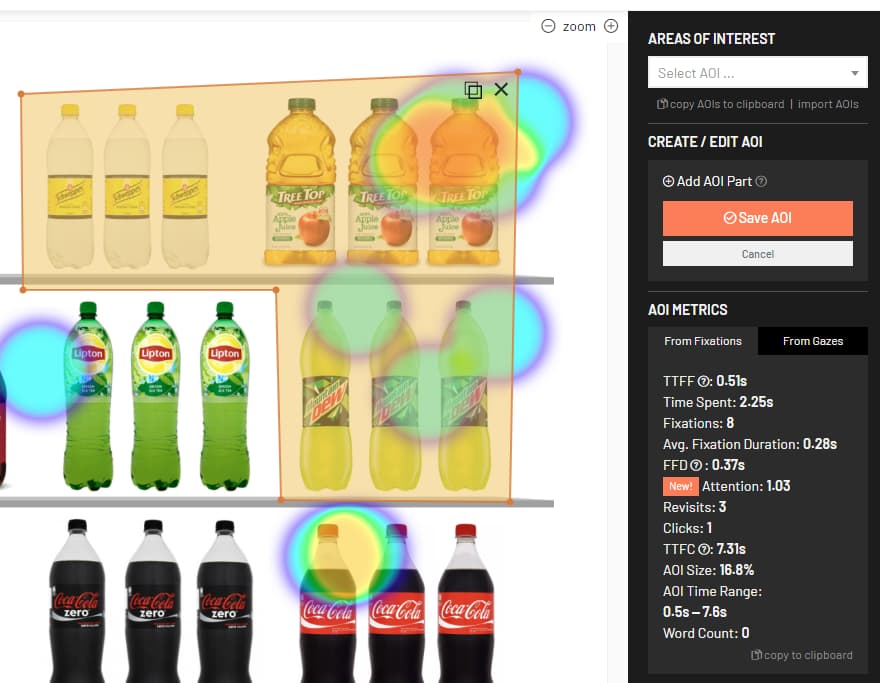
RealEye, the online eye-tracking solution, has just released a new feature that allows users to create free form areas of interest (AOIs) using polygons. This feature enables users to define more complex and irregular shapes for their AOIs, which can be useful for analyzing eye movements on various types of stimuli. Users can also combine multiple polygons to create one AOI, which can be helpful for grouping related elements together.

Support: What is AOI?

To use this feature, users need to select the “Polygon” option from the AOI toolbar and then click on the points where they want to draw the polygon. Users can adjust the shape and size of the polygon by dragging the points or adding new ones.

This feature is available for all types of studies, including images, videos, and live websites. Users can access the feature from the “AOI” tab on the dashboard. Users can also export the AOI data in CSV format for further analysis.

We hope that this feature will enhance your eye-tracking research and provide you with more insights into how people perceive your stimuli. If you have any questions or feedback, please feel free to contact us at support@realeye.io. Thank you for choosing RealEye!
14.0.4 Embedded website tests

July 4, 2023

Exciting news from Realeye.io! We’ve developed a new feature called “Embedded Website Study” that lets you conduct quantitative research directly on your websites using our fresh SDK. This offers a deep dive into user behavior and motivations, leading to improved user experiences and engagement. Read our article about Embedded Website tests for aggregated results

RealEye 14.0 – 14.14 Release Notes

July 4, 2023

In the current version:

  • Embedded Website tests for aggregated results
  • #feature keep scroll offset while browsing between mockup items
  • #csv Quality grade csv column
  • #fix Video replace change name
  • #fix Start mockup clock after user closes message confirm
  • #ui add Malay language
  • #fix AOI import success message
  • #fix live website tests quality stats
  • #fix Normalize button on emotion chart doesn’t expand y-axis to -1
  • #ux Disable “Pull to refresh” test on Android with Chrome.
  • #hotfix When touchend removed swipe/click was triggering both swipe and click resulting in double-click.
  • #hotfix If swipe is enabled and test device is desktop attach click event instead of swipe.
  • #hofix Live website study used to set display time to 0s.
  • Store Participant’s device pixel ratio.
  • #ux – warn users about possible corrupted recording preview for Page URI item type
  • #ui Minimal display time field
  • #ux Mak sure minimal display time do not exceed display time nor study max display time.
  • #fix On study clone, questions used to being cloned two times
  • #ui Improve study wizard – “Embedded Website” and “Screen Recording” type
  • #ui Display aoi id in heatmap aoi sidebar.
  • #fix Fix some CSV not taking exposure number into account properly.
  • #ui Add Norwegian & Danish translations
  • #ui All studies list
  • #ui Remove devices icons from finished list
  • #ui Select devices blockade
  • #performance Upgrade to Tensorflow JS 4.8.
  • #security Detect and block fraud batch payments + disabled devices tooltip
  • Passing query string to embedded website
  • #eyetracker Use wider left eye image to improve accuracy
  • #ux automatically choose camera (first from the top)
  • #fix Expected RE panelist count based on result orders

RealEye 13.13.8-13.15.1 Release Notes

May 8, 2023

Here are some latest’s RealEye updates:

v13.13.8
#ux Display free trial popup only for a basic free trial
#fix Live website not ending (timer used to stop when the tab was inactive)

v13.13.10
#fix change Italian translations for customer

v13.14.0
#feature License expiration email reminder

v13.15.0
#feature Enable swipe on mockup studies (only apply to smartphones and tablets)

v13.15.1
#fix Mouse not tracked when touching screen top.
#fix Participant average quality grade in CSV used to show wrong grades.
#dev Realeye version added to participant logger.

RealEye 13.9.2 – 13.13.6 Release Notes

April 28, 2023

Let’s see what has changed in RealEye over the past week!

v13.9.2

v13.9.3

  • #fix mockup finished after max study time
  • #fix video is muted if trigger unmute is on stimuli (even if trigger play on scroll)
  • #fix Test is paused if the window goes to the background

v13.10.0 (skipped)
v13.11.0

  • #feature Embedding eye-tracker test (in iframe)

v13.12.0

  • #security Iframe embedding security improvement (protection against proxy attack)

v13.13.0

  • #feature Preloading videos

v13.13.1

  • #fix True fullscreen when a test is embedded

v13.13.2

  • add RealEye logo for non-white labeled tests

v13.13.3

  • #ui Hide Realeye favicon on white labeled tests

v13.13.4

  • #fix Mockup study starts when a participant is calibrated, and videos and images have been preloaded

v13.13.5

  • #fix New Quaderno permalink mechanism

v13.13.6

  • #fix Missing preloaded flag check

RealEye 13.8.0 – 13.9.1 Release Notes

April 21, 2023

v13.8.0

  • #feature New hotspot type on study mockups: start video (when in viewport)

v13.9.0

v13.9.1

  • #fix On video (heatmap) end slider previews the frame while dragging

RealEye 13.7.1 and 13.7.2 Release Notes

April 19, 2023
  • #feature: Change AOI name.
  • #fix AOI import only for the authenticated users.
  • #fix On heatmap/recording analyzer load data for the current view type first, then load the rest asynchronously.
  • #fix Reset scroll position on matrix questions.

RealEye 13.6.0 Release Notes

April 17, 2023

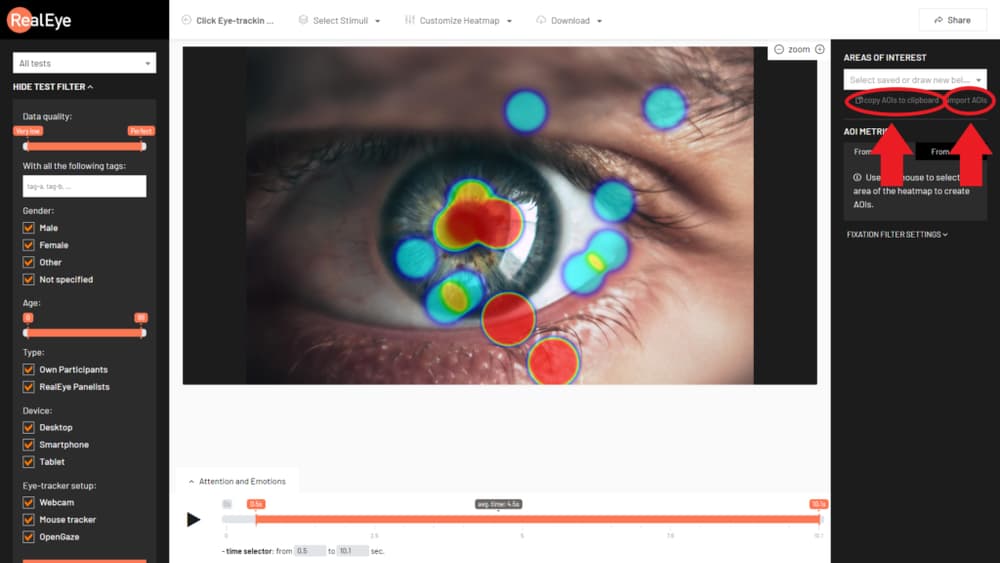
In this version, we created a feature that allows copying created AOIs from one item to any other item in any study. Read more here.
RealEye 13.5.0 Release Notes

April 13, 2023

Features:
– New hotspot type that allows unmuting video on mockups. It can be retriggered to control the mute state.

Security:
– Sharing study results requires a dedicated link to access resources. The study result has the share function disabled. This change does not influence already shared studies.

Fixes:
– Optimization of the algorithm for computing AOI statistics. Computing AOI’s overall size improved.

RealEye 13.0-13.4 Release Notes

April 12, 2023

Here you’ll find RealEye's latest release notes:


Version 13.0

Feature:
Test without eye-tracking: this feature allows conducting a RealEye test without the eye-tracking module. Calibration and related steps are omitted. Instead of a conventional eye-tracker mouse-tracker is used. The feature can be triggered on a specific test if ‘reio-webcam-disable=1 ‘ parameter is presented in the participant test link URL.

version 13.1

Fixes:
– Hide the exposure filter when the study isn’t a mockup.
– Hide cursor on recordings when fielding device is mobile.

version 13.2

Feature:
– Export quality stats to CSV: participants’ quality data can be downloaded as a CSV file (contains all data visible under the ‘Quality Stats and Drop-rate’ tab).

version 13.3

Feature:
– Clone mockup study surveys.

RealEye 12.13.0 Release Notes

March 15, 2023

Yesterday we released RealEye v12.12.0, and yet we’re happy to share another update. Since yesterday, we’ve managed to deliver the following:

  • Show info when Participant data is corrupted and quality stats can’t be computed.
  • Firefox website study blockade.
  • Heatmap and recording downloader.
  • #fix Video upload cancel.
  • #fix Remove double more & use translation instead of static text.
  • #admin Can filter studies by study status with other filtering parameters.
  • #admin Add features in licensing tab.
  • #dev WIP Refractor screen recorder function out of analyzers.

RealEye 12.12.0 Release Notes

March 14, 2023

In this update:

  • Add additional instruction popup with customized text and icons.
  • Users can change a stimulus name.
  • Audio is available on downloaded recordings.
  • Pausing Mockup tests when the “fix eyes” popup is presented.
  • #reliability Change max parallel uploads from 10 to 2 for images and 1 for videos – to make it more reliable.
  • #fix Wrong time range on the heatmap load.
  • #fix Missing quality column in the survey CSV file.
  • #fix Empty external data in keyboard and mouse CSV file & clean double column header prefix.
  • #fix Block upload if the file exceeds 500 MB.
  • #ui Minor message improvement about video transcoding.
  • #fix Do not save the eye-tracking sample if the timestamp is undefined.
  • #fix Workaround added in EBML that fixes webm download.
  • #fix Jobs page twig error.
  • #ui Change wording for additional instruction.

RealEye 12.1 – 12.7 Release Notes

February 24, 2023

New features:

Various improvements and bug fixes:

  • #feture – add new Occupation -> PhD Student
  • #fix Finish on click areas cloned properly.
  • #ui heatmaps dashboards timeslider adapts to the max. data time
  • #ui Change stimulus default display duration to 10s (from 20s).
  • #ui Minor improvements for study enabled devices.
  • #ui add confirmation popup when closing a test tab
  • #fix Data chart does not show.
  • #api #csv Add “aoi_visit_total_count” and “aoi_revisit_total_count” to “AOI Fixations Stats per participant” CSV.
  • #fix – don’t show ignored panelists on recording list
  • #ux – fix translations for Chinese (and others minor)
  • #ux – add global loader bar (like Prolific
  • #ux – set time-to as max-time foe heatmap analysis
  • #ui Link to our new blog page www.blog.realeye.io.
  • #ui Change ‘view’ to ‘exposure’ number on heatmap analyzer
  • #fix Check if video is paused before setting its current time.
  • #performance Speed up “AOI Fixations Overall Stats per participant” CSV.
  • #performance Improve overall performance where database is accessed.
  • #performance Improve performance of reading study stimuli, and stimuli AIOs.
  • #performance Improve performance of “AOIs Overall Stats” CSV.
  • #fix – time slider fo “files” studies
  • #ui Show Stimulus ID when mouse over thumbnail.
  • #ui Rename “item” to “stimulus” on participant quality stats page.
  • #csv “Keyboard and mouse overall per participant” export supports itemLimit and itemOffset.
  • #performance Make “Keyboard and Mouse Overall Per Participant CSV” more reliable for big studies.
  • #ui #fix “You’re not meeting all the criteria”.

Eye-tracking for Mockups

February 3, 2023

We’re thrilled to announce new feature Website Mockup available withing all licenses in RealEye.io

RealEye 12.0 Release Notes

January 31, 2023

New Features:

Various improvements and bug fixes:

  • #feature – show the number of fixation on recordings
  • #fix – tags import (empty + duplicates)
  • #fix – LP with test demo link for mobile
  • #fix – don’t allow external tools for lower licenses
  • #fix – show all AOIs on AOI preview (study dashboard)
  • #fix – Demo should start in selected language
  • #fix – logotype on iframe player has correct A/R
  • #fix – take all the params from URL to prepare the analytics dashboard
  • #fix – sliding through video will show a preview of beginning or end of selector
  • #fix – video player, after showing images have to reset it’s height for playing the video (fixation plot)
  • #fix Emotion chart now aggregates data properly.
  • #fix Fix Gazes CSV download with noiseReductionLevel specified.
  • #ux – show gaze plot behind the fixation plot (fixations are more valuable(?))
  • #performance Improve memory usage for studies with a lot of survey responses.
  • #fix On aggregated data used to skip last participant division.
  • #ux – fix Japanese translations
  • #fix Fix Overall AOI Stats export caused by invalid fixations order.
  • #feature – increase panelists price
  • #ui – update team page
  • #fix Handle HTML5 Video player reporting timestamp in invalid order.
  • #ui hide gazeplot by default
  • #feature last survey for REALEYE_PANESLITS
  • #feature: add viewMap and fogView to heatmaps panel
  • #feature #dev add data loader to heatmaps dashboards
  • #ux – lower down gazeThreshold for smartphone
  • #fix Fix recording page.
  • #fix Fix preview page.
  • #fix heatmap opacity for fixations
  • #lower minimum AOI size
  • #feature – keep group ID for dispatching studies from URL (fielding with Prolific)
  • #feature – the ability to skip instructions using a reio-skip-instructions flag
  • #performance Cache K-Factor and Facial Coding data.
  • #ui Heatmaps have mouse cursor and clicks hidden by default.
  • #ui Minor labels improvements.
  • #fix Fix Heatmap not selecting Participant given in URL.
  • #feature – add Finnish translation
  • #feature – copy AOI Data to clapboard
  • #feature – copy metrics to clipboard
  • #ux – show panelist details in test preview
  • #fix Fix “Time to first gaze”.
  • #UX – languages: Kannada, Tamil
  • #ui Improve “BETA” mark for Voice Over feature.
  • #beta Open tested website with test parameters.
  • #ui Translation fix in fr and it.
  • #feature – ignore participants from csv
  • #feature – dedicated endpoint for ignoring many participants
  • #fix Show heatmap for selected participant.
  • Participant external data in “AOI Click count per participant” and “Survey Results” CSVs.
  • #ui Change stimulus default display duration to 10s (from 20s).
  • #ui Minor improvements for study enabled devices.

RealEye 11.0 Release Notes

September 9, 2022

RealEye version 11.0 provides even more reliable and precise eye-tracking metrics and K-factor values.

NOTE:
Please be aware that heatmaps, recordings, and AOI statistics in RealEye version 11.0, in many cases, are a bit different from the previous versions.

Please read RealEye’s version 11.0 Fixation Filter description for more information.
RealEye API version 2.3.0 (released with RealEye v11.0) Documentation. Please check the API Changelog.

New Features:

  • Introduce a “Maximum Fixation Duration (ms)” parameter for the Fixation Filter.
  • Introduce a “Maximum Saccade Duration (ms)” parameter. Allows adjusting the K-factor algorithm.
  • K-factor raw data export.
  • Support WEBP image format.

Major Changes:

  • Improve gaze velocity algorithm for (I-VT) Fixation Filter. Gaze velocity calculation is now more uniform. Velocity value is normalized by screen diagonal, which makes this parameter independent of participant resources.
  • Improve eye-tracking samples denoising by applying a Time of Interest (TOI) in the moving median algorithm. Moving median algorithm formerly used fixed median range. The new solution that takes the median range based on time of interest is more resilient to various edge case scenarios, for example, partly missing data or different sampling rates.
  • Improved default settings of the Fixation Filter.
  • #api New filtration parameters (maxFixationDurationMs and maxSaccadeDurationMs).
  • #performance Eye-tracking samples are no longer interpolated up to 60 Hz but up to 30 Hz.
  • Eye-tracking samples are denoised first and then interpolated.
  • New Participant Quality Stats algorithm (version 9). Gaze is considered to be “on screen” for gazes up to 5% “off the screen”.
  • User interface and experience improvements:
  • Add time selector inputs for the Analytics dashboard.
  • Add the Albanian language for the test.
  • Add the Hindi language for the test.
  • Add the Vietnamese language for the test.
  • Add the Tagalog language for the test.
  • #ui Add information about K and Smartphones to LP (Landing Page).
  • #ui Change “7-days free license” -> “7-day free license”.
  • Increase the limit of video files to 500 MB for replacing the videos.
  • #ui Change translation to fit UI.
  • #ui Heatmap correction by 1% instead of 30px.
  • #translate “OK” in generating the steps

Various improvements and bug fixes:

  • Fix moving median algorithm (denoising). The old version was overriding raw data while performing filtration, which compromised the processing results.
  • Improve automated tests for Fixation Filter (and related components).
  • #fix Fix seach study by name & ID
  • #csv #api #performance Stream all CSV files.
  • #fix Increase bottom margin for the player bar to show horizontal slider when zooming on heatmaps dashboard.
  • #fix Company discount was not calculated properly.
  • #performance Cache saccades.
  • #ui #heatmap Don’t show empty sections below “Noise reduction window” when “From Gazes”.
  • #fix Fix contact form.
  • #fix Fix Start –> “Começar” in PT.

RealEye 10.1 – 10.13 Release Notes

July 31, 2022

New Features:

  • Stimuli grouping with pinning and randomization.
  • WYSIWYG editor for study instructions.
  • Mean Attention K.
  • Star a Study.
  • Replace image/video of existing stimulus.
  • Data Chart with saccades.
  • Clone study stimulus.
  • #api Set study participant and panelist count.
  • #api Finish study.
  • #api Provide Study “participationLinks”.
  • #api Endpoint to delete Study and delete Item.

Major Changes:

  • CSV export on Heatmap page applies all selected filters (e.g. age, gender, tags)
  • #api #csv AOI Overall Stats can provide data for limited count of Items when using `itemsOffset` and `itemsLimit` GET parameters.
  • #api #csv AOI Overall Stats can provide data for limited count of AOIs when using `aoisOffset` and `aoisLimit` GET parameters.
  • Improve 3DSecure payments.
  • Disallow Study modification when RealEye Panelists are providing results.
  • #api Specify stimulus CDN URL via test link parameter.

User interface and experience improvements:

  • Minor UI improvements for license usage bar.
  • Show License “active from / till”.
  • user can select entire image as trigger with single click
  • Show license related dates in UTC timezone.
  • Improve error message when study could not be cloned.
  • Improve error message when could not compute AOI stats.
  • Add “Traditional Chinese” translation.
  • Translate test page title.
  • Sort links for all languages.
  • Requested longer question/answer limit in survey module.
  • Improved BR translations.
  • #ui “Set Participants” shows actual participant and panelist number.
  • Add Romanian translation.
  • Reset aoi selector if time range is changed.
  • Add max saccade duration ui slider.

Various improvements and bug fixes:

  • Profile form was not storing information about account for non-whitelabel users.
  • Changing participants limits when external URLs are enabled caused error 500.
  • Fix computing AOI stats for saved AOI when changing its time range.
  • Make sure we’re storing the data from a video stream.
  • AOI save returns error (when AOI was not changed, just saved).
  • Fixation Plot player on mobile videos.
  • JS error (setInterval was not cleared).
  • Optimize how instructions are being displayed if they are longer (scroll).
  • Prevent WYSIWYG editor from saving empty string.
  • Redirect to quota-full (if set), if the study is filled.
  • Automatically create new license for Subscription new billing cycle.
  • Show 400 error page with info when study runs with invalid item filename.
  • Don’t scale UP images (by width).
  • Try to correct AOIs when cloning a study.
  • Stream AOI Overall Stats CSV so download starts as soon as first data is available.
  • #fix – don’t export ignored participants data.
  • Don’t include ignored participants in Survey exports.
  • #ui Show actual Participant Quality Stats algorithm version – not the latest one.
  • #fix fantom clicks
  • #et Gaze max duration changed from 16 to 33 ms (as for 30 FPS webcam).
  • #fix – don’t take deleted items into account when generating testFlow from URL
  • #ui Fix Participant Log missing translation.
  • #fix Fix FireFox webcam access issue.
  • #fix Fix total usable participant count (don’t count non-checked RE panelists).
  • #fix Fix sending email about RealEye Panelists results collected.
  • #fix – when canceling transcoding cloned video – it disappears
  • #security Check blog URL `page` is an integer.
  • #security Require all routes `{studyId}` to be an UUIDv4.
  • #security Require all routes `{itemId}` to be an UUIDv4.
  • #security Require all routes `{participantId}` to be an UUIDv4.
  • #dev Upgrade to Symfony 5.4 (LTS).
  • #fix for drag&drop groups
  • #fix: removing transparent background from PNG images and replace with #ffffff
  • Remove affiliate page.
  • #fix heatmaps dashboard: left slider will work after the content is resized
  • #fix allow purchasing own participants with a step of 5 (min. 5)
  • #fix Subscription license valid until end of last day.
  • #fix #ui Show properly “Team collaboration” is available or not.
  • Update stats on changed not on changing.
  • #fix Subscription based license valid for one day longer so Braintree can charge for the next billing cycle.
  • #fix: Cloning a study is not copying stimuliFlow
  • Revoke white label feature when subscription expired.
  • Hosted session waits for audio and video stream to start.
  • #fix: Don’t load stimuliFlow module when videos are still being transcoded (UI is blocked)
  • Hosted session works with white-label enabled.
  • #fix: website heatmaps can be zoom in / out.
  • #fix: player is loading video when opened in a new tab.
  • Increase video max file size to 500 MB.

RealEye pricing is now updated

July 19, 2022

RealEye is committed to providing you with the quality you expect and deserve. We’ve found a way to minimize the price increase while keeping the continuous development of the tool to increase the quality of our service. Here’s the new pricing model:

  • Basic: $249/month; $2490/year;
  • Standard: $600/month; $6000/year;
  • Student: $29/month; $290/year;
  • University: $420/month; $4200/year;
  • $1.2/each – additional own participant;
  • $10/each – additional RealEye participant;

We appreciate your continued support through this time of growth and change. If you have any further questions regarding the new pricing, please feel free to contact us. Our team is always happy to discuss this situation with you.

Sincerely,
– RealEye Team

RealEye 10.0 Release Notes

April 10, 2022

RealEye 10.0 Release Notes:

  • run studies on smartphones
  • UX/UI improvements
  • minor bug fixes

Smartphone Eye-Tracking is now Available!

April 10, 2022

RealEye now allows you to run your studies on smartphones! You can set up your study to accept mobile and/or desktop participants in the study settings. So far, we can observe that mobile tests work perfectly for testing long-vertical images (e.g., mobile page mockups) and vertical video advertisements. As an outcome of a Smartphone study, you can expect to see the same data and metrics as for a traditional desktop fielding.

Please feel free to try our Smartphone Demo study here: Start demo study

RealEye 9.0 Release Notes

March 23, 2022

RealEye 9.0 Release Notes

New Features:

Major Changes:

  • User interface and experience improvements:
  • Show current license usage on the dashboard (top right corner).
  • Trim white-space characters from survey question and answer.
  • Fielding question redirects to ScreenOut URL.
  • Improve Portuguese and Italian translation.
  • Show how many participants have skipped the test.

Various improvements and bug fixes:

  • Reducing participant offset – allows starting the test if a browser is a small window.
  • Fix computing quality stats for studies that have all items removed.
  • Fix computing quality stats when eye-tracking data have only one gaze from “0 ms”.
  • Handle double click better with “Finish on click” enabled.
  • Move machine learning models (FaceLandmark) to a different folder on CDN so it doesn’t get blocked by some Ad/TrackingBlockers.
  • Handle UI sending AOI out of range size.
  • Speed up metrics computation.
  • Backend source code major refactoring.

RealEye 8.14 Release Notes

January 19, 2022

We’ve got a small yet significant update for you: now a RealEye study can simultaneously consist of images and videos (previously you’d had to create two separate studies). Hopefully, it will make your research more effortless!

RealEye 8.14 Release Notes

New Features:

  • Mix videos and images in single study
  • the ability to disable popup with head correction
  • enable confirmation popup before skipping the test

Minor UI/UX improvements:

  • Improved Czech translations
  • New Arabic translations (LTR)
  • Improve German translations
  • Add Indonesian translations

RealEye 8.13 Release Notes

January 2, 2022

RealEye 8.13 Release Notes

  • New Features:
  • be more strict when correcting the eyes position
  • uer can define display time for each fixation cross
  • get rid of “relaxation” step
  • Minor UI/UX improvements:
  • remember params in URL if head moved too much during the calibration
  • Add ‘Tester Tags’ to all “Raw gazes denoised” CSV.
  • Add ‘Tester Tags’ to all CSVs with Tester data.
  • Optimize study page loading time.

RealEye 8.12 Release Notes

December 24, 2021

RealEye 8.12 Release Notes:

  • Codnduct studies with a hardware eye-tracker (GP3)
  • Minor UI/UX improvements:
  • Fix auto-scrolling off for long images.
  • “Remember me” checkbox when logging in.
  • security Enable log-in fail rate limit (5 per minute).
  • Remove ReCaptcha from login form.

Thanks to RealEye Open Gaze API Adapter, you can now conduct your studies using the GP3 hardware eye-tracker! This feature is currently available only in the PRO plan for Beta users, so please contact us if you want to try it out!

RealEye 8.11 Release Notes

December 12, 2021

RealEye 8.11 Release Notes

  • New Features:
  • The ability to run test with specified items
  • add Thai translations
  • Minor UI/UX improvements:
  • Don’t store eye-tracking data for loading (buffering) video
  • Fix tester quality “gaze on screen” stats for narrow stimuli.

RealEye 8.10 Release Notes

November 24, 2021

Please note that image items (stimuli) have scrolling DISABLED by default – as that’s the majority of use cases.

RealEye 8.10 Release Notes

RealEye 8.9 Release Notes

November 19, 2021

Cloning study is now possible with RealEye 8.9. Fast way of creating study copy with the same items (stimuli) and settings.
Read feature description on our support page: How to clone a study.

RealEye 8.9 Release Notes

  • New Features:
  • Cloning (copying) Study.
  • Minor UI/UX improvements, e.g.:
  • Add video platform demo to Free Trial.
  • Various improvements and minor bug fixes:
  • Update 3rd party libraries.
  • Fix Keystroke stats when data is not available.
  • Don’t send Free Trial mailing to people who join the company as collaborators.
  • Fix study edition flow for reverted study.

RealEye 8.8 Release Notes

November 10, 2021

RealEye version 8.8 can run an eye-tracking test with only the specified items.
Read feature description on a How to run test with specified items support page to know more.

RealEye 8.8 Release Notes

  • New Features:
  • Update TesterQualityStats to use StudyFlow (not require all Items).
  • API:
  • New API endpoint GET /studies/{studyId}/flow.
  • Remove storing Tester External ID taken from `Id` query parameter.
  • Minor UI/UX improvements, e.g.:
  • Add submenu with actions for the study list.
  • Edit item edit boxes smaller.
  • Remove videos when selecting a new study type.
  • Various improvements and minor bug fixes:
  • Update 3rd party libraries.
  • Store tester age from the URL params.
  • AOI part can’t exceed image width/height.
  • Fix filtering by pressed key – an UPPER phrase for searched value.

Multipart AOI

October 30, 2021

Thanks to the multipart tool – AOI, you can now combine data calculations from several areas scattered throughout the image or video. Please see the following video to find out more about what’s new:

RealEye 8.7 Release Notes

October 30, 2021

We’re happy to announce that we’ve just released RealEye v8.7, which contains 2 new features and some improvements.

RealEye 8.7 Release Notes

  • New Features:
  • Create AOIs (areas of interests) from several smaller parts.
  • Record participants voice (voice-over) in the “Live Websites” type of study.
  • Minor UI/UX improvements.
  • Various improvements and minor bug fixes.

RealEye 8.6 Release Notes

October 26, 2021

With many new features and improvements, we now also make our API publicly available!

RealEye API is still being developed according to our customers’ needs, so be sure there will be a lot of new API features coming soon :)

RealEye 8.6 Release Notes

  • New Features:
  • Public API via HTTP to fetch collected data.
  • Pass additional variables when dispatching links with several studies.
  • Allow un-ignoring participants.
  • Include full test URL in the Tester Log when the tester opens the test page.
  • The test-dispatch link won’t include finished studies (unless all are finished).
  • Change to the maximum of 300 images in images based study.
  • CSV and API:
  • Export keyboard and mouse stats per participant.
  • Include `tester_display_gender` in CSV files.
  • Include Item CDN URL in all CSVs.
  • Include Test Criteria in CSV notes.
  • Minor UI/UX improvements, e.g.:
  • Update Brazilian translation.
  • Add brand new Turkish translations and update existing ones.
  • Translate the whole service to Polish.
  • Better UX for video heatmaps.
  • Add dropdown with languages to the participation link.
  • Use GIF for video item preview.
  • Various improvements and minor bug fixes:
  • Fix white-label not storing tester logs for non-English language.
  • Fix bug with analysis dashboard.
  • Fix sliders for image based studies.
  • Fix average display time when params are fetched from URL.
  • Fix copy “en” study link.
  • Fix for recording player -> change videos without pausing.
  • Show a tooltip with Item ID and filename.
  • Apply security patches.

Pin items and embed recordings

September 9, 2021

We’re happy to announce that we’ve just released RealEye v8.5, which contains 2 new features and some improvements: the ability to pin some the items in the desired order and the ability to embed the recordings.

Thanks to the “pinning” feature, you can set control the randomization and eg. define which element will be always presented first or last. Please take a look at the following recording to learn more about the news:

If you’re still wondering how to move your studies on-line, take a look at our latest article: Eye tracking study: Online vs. Offline.

RealEye 8.5 Release Notes

September 9, 2021

RealEye 8.5 Release Notes:

  • new feature: pin items
  • new feature: ability to embed recordings
  • minor UX/UI improbvements and bug fixes

RealEye 8.2, 8.3 and 8.4 Release Notes

August 20, 2021

RealEye 8.2, 8.3, and 8.4 Release Notes

New Features:

  • Attaching params to finishURL is an option (true by default to maintain current studies behavior).
  • Ability to set watermark along with its opacity level (only for a specific role).
  • Add filtering by the keypress.
  • Add average viewing time to a slider.

Metrics:

  • Count separate visits if there’s a long data gap between fixations.
  • Change fixation filter default vt to 180%/s

CSV:

  • CSV with “revisit count” and “average revisit count”.
  • CSVs with test_item_display_order.
  • All CSVs with tester_quality_grade and tester_quality_grade_item.

Improve handling external test data and RealEye params.

Minor UI/UX improvements, e.g.,:

  • Update NL translations.
  • Update Chinese translations.
  • Speed up metrics computation.

Various improvements and bug fixes, e.g.,

  • Various security improvements.
  • Upgrade backend to Symfony 5.3.
  • Fix using eye-tracker behind Chinese firewall.

RealEye 8.1 Release Notes

June 17, 2021

We haven’t been idle since the last update (RealEye 8.0). This time we would like to present:

  • Fixation Plot – available for participants’ recordings (Read more here),
  • the ability to slow down the speed of recording display,
  • the surprise level as a new emotion available in our Facial Coding feature (Read more here),
  • new demos for all study types,
  • the Quick Preview option added with shortened calibration and verification
  • no need to click “OK” when “return your eyes to green dots” (it was hard to do when participants were asked to click sth on keyboard).

If you’re still wondering how to move your studies on-line, take a look at our latest article: Eye tracking study: Online vs. Offline.

Amazing Surveys Module

April 23, 2021

We’re happy to announce that we’ve just released RealEye v8.0, which contains a pretty commonly asked feature: the ability to ask participants several, different types of questions after each stimulus.

Each survey can contain questions with several question types:

  • Text input (long/short)
  • 5-star grading (Likert scale)
  • Single/ multiple choice
  • Matrix questions
  • Images-based answers

Thanks to this feature there’s no need to redirect participants back and forward to external questionnaires – everything now can be handled directly on RealEye platform which makes the entire process (both, for the researcher and the participant) easier and more intuitive.

Special thanks to Startup Spark from ŁSSE.

If you’re still wondering how to move your studies on-line, take a look at our latest article: Eye tracking study: Online vs. Offline.

RealEye 7.3 Release Notes

March 11, 2021

We’re happy to announce that we’ve just released RealEye v7.3, which contains a pretty commonly asked feature: the ability to finish displaying stimuli (image/video) on a keystroke event.

This ability will enable researchers to create implicit reaction tests like IAT or IRT and measure not only which keys were pressed but also what was the reaction time was and the average reaction time for each key separately.

Please read more about this recent feature in our Support

Special thanks to Pablo for requesting this feature long time ago, it’s finally out there! :)

If you’re still wondering how to move your studies on-line, take a look at our latest article: Eye tracking study: Online vs. Offline.

RealEye 7.2 Release Notes

March 5, 2021

RealEye v7.2 release focused mainly on ensuring more useful data.
This time we’ve tackled two things:

  • Reduce eye-tracking data gaps when the participant moves head too much.
    SOLVED: The eye-tracking test is paused when the “fix your position” popup is displayed.
  • Increase eye-tracking sampling rate for low-end/old hardware that does not support WebGL (GPU acceleration).
    SOLVED: We’re now using the latest browser features that should result in up to a 40% higher eye-tracking sampling rate.

Other essential updates in version 7.2:

  • We’ve enabled the ability to export Facial Coding data into CSV (Facial Coding is still in BETA).
  • The price for a University license changed to $350/month. If you have active University license – those changes won’t affect your account.
  • Exports are re-ordered into several categories.
  • Drop-rate info for the last 30 and 7 days.

If you’re still wondering how to move your studies on-line, take a look at our latest article: Eye tracking study: Online vs. Offline.

RealEye 7.1 Release Notes

February 27, 2021

RealEye 7.1 Release Notes:

  • We’ve improved overall performance and reliability.
  • The study can now have up to 50,000 participants.
  • YouTube video as a source is not supported now. You can upload a video to our servers instead. It’s much more reliable.
  • Facial coding offers “Neutral” and “Happy” stats.
  • French instructions for participants.
  • Unused participant spots get released when a study is removed.
  • Participant Quality Stats page can show recording and heatmaps.
  • University PRO license is available.
  • Drop-rate CSV.
  • CSV filename with Study/Item name.
  • Improve tester logs – page opened.
  • Optimize Heatmap playback.
  • Speed up gaze data download (use cache) and reduce CSV export time.
  • Speed up AOI Overall Stats computation.
  • RealEye’s Public Roadmap is now available.
  • Other UI/UX tweaks, performance improvements, and bug fixes.

RealEye 7.0 Release Notes

January 20, 2021

RealEye version 7.0 introduces quite significant improvements in eye-tracking metrics we provide on the dashboard and in the exported CSV files.

NOTICE: Some metric values might have changed from what you’ve seen in previous versions of RealEye. That’s because we’ve improved our algorithms to provide even more accurate and useful data.

If you have any questions regarding this release please, contact us via email or chat. We’ll be happy to answer all your questions.

A detailed explanation of the eye-tracking metrics you can get from RealEye is described on this support page.

RealEye 7.0 release notes:

  • Improved eye-tracking metrics, e.g.:
  • Show AOI size in percentage of the whole stimuli.
  • Show AOI time range.
  • A new metric: “Gaze count”.
  • A new metric: “First Fixation Duration”.
  • Fixation is considered valid for the AOI time range:
    – if it has begun exactly when the AOI time range starts or later
    AND
    – if it has begun before the end of theAOI time range
  • Fixation point is an average of all included gaze points.
  • For smoothed and normalized data gaze (fixations), raw gaze timestamp is now considered to be gaze end time.
  • “Revisits” metric improved.
    AOI visit is detected:
    – if there’s a fixation in the AOI, or many fixations “one after another”.
  • The readability note removed – it was too subjective.
  • Data export improved: CSV files with AOI data take the AOI time range into account.
  • You can manually adjust the “Noise reduction” setting both for fixations and gazes.
  • New data export file: CSV with AOI Overall Stats. It’s a file that contains most of the metrics you see on the dashboard.
  • New data export file: CSV Raw Gazes Denoised.
  • Improved Data Chart.
  • Minor UI/UX and performance improvements. Bug fixes.
  • Security and reliability improvements.

Special thanks to Luis, one of our customers, who has given us a lot of feedback regarding our metrics and data export feature.

Live eye-tracking hosted session (BETA)

January 15, 2021

Sometimes it’s not enough just to know where somebody was looking. There are studies or cases when it’s also required to talk with the participant during the eye-tracking session, give him/her additional instructions, ask some questions to better understand the behavior, and so on. Now RealEye has a perfect solution for such needs – Hosted Sessions. They can be launched for any type of stimuli (images, videos or live websites). You need to give access to your microphone (as your voice is also recorded) and a participant needs to share the screen and grant access to the microphone as well. You’ll be able to see the participant’s gaze live during the session and after the test watch the usual participant’s recording or the hosted recording with your conversation.

Read how to use Hosted Sessions and what are the requirements here: https://support.realeye.io/hosted-sessions/

Please note that this feature is still in a BETA stage. We’re still testing it and working on some improvements.
RealEye 6.14 Release Notes

January 11, 2021

RealEye 6.14 release notes:

Special thanks to Stefan, one of our customers, for working closely on the Hosted Sessions feature.

RealEye 6.13 Release Notes

November 10, 2020

RealEye 6.13 release notes:

  • Heatmap filter allows filtering testers by quality.
  • Quality statistics algorithm has been improved. Here’s how it works.
  • Study Quality Statistics page is now available. Click the “Study Quality Stats >” link on the Study results page (top right).
  • Minor UI/UX improvements and bug fixes.

Special thanks to Cole, one of our customers, who has given us a lot of feedback.

RealEye 6.12 Release Notes

November 4, 2020

RealEye 6.12 release notes:

  • Faster eye-tracker initialization on low-end hardware.
  • Improved tutorial for participants.
  • Possibility to revert running study to draft.
  • Possibility to tag participants and filter heatmaps by those tags.
  • Minor UI/UX improvements and bug fixes.

RealEye 6.11 Release Notes

October 9, 2020

RealEye 6.11 release notes:

  • Possibility to create study with multiple videos.
  • Video stimuli can be uploaded via web browser and hosted on our servers.
  • Technology whitepaper updated.
  • Facial Coding improvements.
  • Minor UI/UX improvements and bug fixes.
  • Backend engine upgraded to PHP version 7.4

RealEye 6.10 Release Notes

September 30, 2020

RealEye 6.10 release notes:

  • Improved accuracy for various background stimuli.
  • “Gaze vs. Click” accuracy in the “Quality Stats”.
  • Video eye-tracking from 3rd party CDN, with the possibility to add multiple videos to a single study.
  • Collecting payment address data for better invoicing.
  • Customers can access a billing area for their invoices and payment history.
  • Minor UI/UX improvements and bug fixes.

For getting the most useful results, please read our support article: How to get accurate results?

RealEye 6.9 Release Notes

September 21, 2020

RealEye 6.9 release notes:

  • Test quality details page.
  • Minor UI/UX improvements and bug fixes.

RealEye 6.8 Release Notes

September 4, 2020

It’s now possible to get even higher webcam eye-tracking accuracy by using your smartphone and your PC/Mac webcam.
See DEMO of an eye-tracking test and use two devices to see how it works.

RealEye 6.8 release notes:

  • Smartphone as an additional eye-tracker.
    We recommend an Android device and Google Chrome web browser.
    Sadly, Apple has blocked browsers on iOS to use iPhone’s webcams.
  • Possibility to specify RealEye participants region and language.
  • Export of AOI Fixation Order and AOI Click Count to CSV.
  • Minor tweaks in the fixation filter.
  • Participants no longer see the results after finishing the test.
  • Minor UI/UX improvements and bug fixes.

RealEye 6.7 Release Notes

August 4, 2020

An annual subscription is now available! Subscribe now and get two months for free! Check Our Pricing >

RealEye 6.7 release notes:

  • Annual subscriptions.
  • Performing eye-tracking tests in Firefox is now possible thanks to performance optimizations.
  • Improved eye-tracking precision and accuracy.
  • In the case of multiple webcams, allow choosing which one to use.
  • Speed up heatmap loading time.
  • Minor UI/UX improvements and bug fixes.

RealEye 6.6 Release Notes

July 21, 2020

It’s now possible to get more feedback from the eye-tracking test participant thanks to customizable questions.
Every image, video, or website can now be followed up with a single or multiple choice question.

RealEye 6.6 release notes:

  • Questions can be asked after every stimuli.
  • The study page has now the “Participant”-centric tab to show precisely the test flow.
    It also has the “Items”-centric tab to show survey results in one place.
  • Heatmap offers now a new AOIs CSV export with more details. Eg. Time To First Fixation for every AOI for every participant.
  • The dashboard is now also available in Spanish and Portuguese (Brazilian).
  • Minor UI/UX improvements and bug fixes.

RealEye 6.5 Release Notes

July 6, 2020

RealEye version 6.5 comes with a new face detection algorithm and many performance optimizations. More detailed face mesh allows us to start working on face coding. We plan to provide emotion analysis quite soon.

RealEye 6.5 release notes:

  • A high sampling rate (up to 60 Hz) can now be achieved even on a low-end laptop.
  • Slight head movements have a smaller impact on gaze prediction.
  • White label tests now use a separate non-branded domain.
  • Minor UI/UX improvements and bug fixes.

We’ve started working on the Spanish and Portuguese versions of our service. Having now the improved webcam eye-tracking, we’re also preparing to allow up to 20 minutes long studies soon.

NOTE: We support only Google Chrome and Chromium-based web browsers (e.g. the latest Microsoft Edge).
For example, Firefox does not offer hardware acceleration, which causes too low accuracy and precision of our eye-tracking algorithm.

RealEye 6.4 Release Notes

June 9, 2020

RealEye 6.4 release notes:

  • Live websites testing (beta – works on Chrome and Firefox)
  • uploaded image size limit increased from 12 MB to 30 MB
  • Minor improvements and bug fixes.

Live websites testing (beta)

June 9, 2020

The long-awaited feature, live website testing is now available. All you have to do is:

  • create your eye-tracking study at RealEye.io
  • add the website URL, that you want to test
  • choose participants and send the participation link
  • wait for results

As a result, you’ll receive a recording of each tester (gaze and cursor).

Do you want to test it by yourself as one of the participants? Click here!

RealEye 6.3 Release Notes

May 29, 2020

RealEye 6.3 release notes:

  • Unused participants and RealEye panelists slots get unlocked when the study is finished manually.
  • Study gets automatically finished when all results got collected.
  • Own participant count can now be set with a step of 1.
  • A single study can now have up to 100 images.
  • New pricing.
  • UI and UX improvements.
  • Bug fixes and security improvements.

RealEye 6.2 Release Notes

May 12, 2020

RealEye 6.2 release notes:

  • Add Fixation Filter – based on gaze velocity.
  • Add Signal Noise Reduction – moving median.
  • Add data interpolation (to 60 Hz).
  • Work on gaze data outside of the screen range.
  • Minor UI/UX improvements.
  • Minor bug fixes.

We would like to thank Nick, one of our customers, for giving us a precious feedback about the new features.

RealEye 6.0 Release Notes

April 16, 2020

Main changes in version 6.0.0:

  • Up to 10 minutes of study is now possible (increased from 1 minute).
  • More advanced calibration.
  • Better head movement handling.
  • Higher eye-tracking accuracy and precision.
  • Some UI/UX improvements.
  • A few bug fixes.

Up to 10 minutes study and higher accuracy

April 16, 2020

Many of our customers want to conduct studies much longer than 60 seconds. We’ve been working hard on making it possible, and we’ve finally succeeded! :)

Version 6.0 of RealEye has improved the calibration process. Thanks to that, you can now run studies up to 10 minutes long! Panelist spends a bit more time preparing for the study, but it results in even higher accuracy and precision than before.

RealEye 5.7.0 Release Notes

April 4, 2020

We’ve made quite a lof or UI changes in version 5.7. We believe that now doing an eye-tracking study is even more comfortable than before.

Main changes in version 5.7.0:

  • New UI/UX. Quite a lot of major and minor changes.
  • We’ve decided to use the name “panelist” instead of “tester”.
  • We’ve decided to use the name “image” instead of “item”.
  • Improved the dashboard performance.
  • Improved recordings (eg. handling images with various aspect ratio).
  • We now store results from panelist that, for example turned head too much.
  • Study can have now up to 40 images.

RealEye 5.6.0 Release Notes

March 29, 2020

Since recently released version 5.6.0 you can now simply download the eye-tracking heatmap.

How to download the heatmap?

  • 1. Open study heatmap
  • 2. Press the “Download Heatmap” button.

You can also use the “Customize Heatmap” menu and download the version you like the most.

You can check this feature on our sample page.

Other changes in 5.6.0

  • We will warn you before ignoring a panelist.
  • New, improved look of gaze point on gaze recordings.
  • Basic and Study plans are now limited to 15 Hz.
  • More attractive calibration process – exploding dots.
  • Minor UI improvements in some places.

The world’s first 60 Hz webcam eye-tracking is here!

March 25, 2020

We are really excited to give our brand new 60 Hz webcam eye-tracking into your hands! We’ve been working hard on making it possible to offer this new feature so your research can get to the next level. Thanks to this feature you can get gaze-point recordings with a gap of just 16 ms between them. 30 FPS webcam offers a gap of 33 ms.

Hardware and software requirements:

  • 60 FPS webcam
    To use our online 60 Hz eye-tracking you only need a webcam that can record at 60 FPS. We’ve been testing it for example with Logitech C922 camera. You can easily find many affordable 60 FPS webcam on the internet. A webcam has to offer 60 FPS at a resolution of at least 720p.
  • PC/Mac with at least 3 GHz 4-core CPU.
    We recommend 6th gen Intel i5 or better.
  • Up to date version of Google Chrome browser.
  • RealEye Plan that offers Sampling rate up to 60 Hz.

Enjoy!

Map your item and finish test on click

January 9, 2019
  • Combine item into single clickable mockup with image mapping
  • Set up your study with advanced settings: hide separation screen, randomize your images or disable survey as you please!
  • Place your eye-tracking study inside an external survey
  • Complete re-design of the system (we love it!)